Managing a Large Photo Library
The key to managing a large photo library is organisation. Of course this very rarely happens straight out of the gate; new photographers organise pictures randomly, if at all, ending up with images splattered across multiple hard drives, desktops, USB keys, microSD’s and so on. By the time you realise you have a problem, you’re looking at many hours of reorganisation. Far better to address this early.
Table of Contents
Organisation is Key
Organisation needs to be thought through away from the software if it is to be useful. Simplicity is your friend here, if you have an overly complex or detailed directory structure or Metadata organisation then you are unlikely to be able to follow through without discrepancies creeping in.
Your organisation should ideally be independent of any software. Regardless of what software is being used, Lightroom, PhotoLab, you need to think about both organisation and backup before you get too deep into the swamp.
The structure of a photo library is up to you. We all have slightly different requirements and so we use different methods to organise our photos. The most important thing is whatever structure you choose should work for you.
My Organisation
The way I organise photographs was geared to my commercial photography work and perfected over many years, You’ll see the sense of it as I describe it.
From Camera to Drive
So far as moving files from the camera cards to a more permanent drive, I keep a separate drive for every regular client. And one for one off jobs. So this a convenience mechanism, I may be staying in a hotel, I’ll upload the files from the card to the drive every night, thus ensuring that I have two copies of the shoot. One on the card and one on the drive.
Back in the Studio
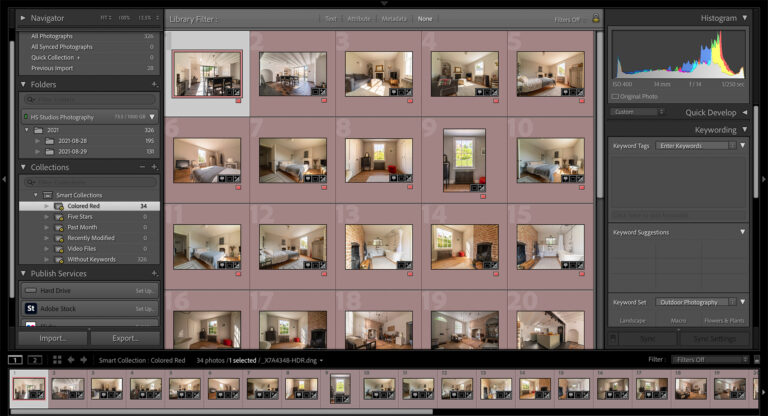
I use Lightroom to organise my photo libraries and I create a new catalogue every year. The clients are represented by directories, below which I’ll stick with the year, date format favoured by Lightroom.
This arrangement means I can track down an archived image for a client in a few minutes at most. I simply need to know which year it was shot in.
Video
If I was doing this in PhotoLab, I can keep the same structure. As PhotoLab is file system based, I simply point it at the drive and directory I need. I can also use tools like PhotoMechanic to support this system.
Since I moved to Spain and reduced my commercial work in favour of landscape photography, I use locations instead of clients in the same way. As my business grows, I can create another layer under countries to point to specific locations within that country.
Metadata & Search
In order to search for images, once you have found the right drive or directory, you need to add metadata when you import the image. This descriptive metadata is usually kept in a sidecar file that the program, Lightroom or PhotoLab for example associates with the image file.
Metadata also needs organisation, especially if you are managing a large photo library. XMP (extensible metadata platform) is an Adobe schema that follows IPTC (International Press Telecommunications Council) standards. IPTC defined the standard approach to metadata in the technical, descriptive and administrative domains that has been adopted by XMP.
Technical Metadata
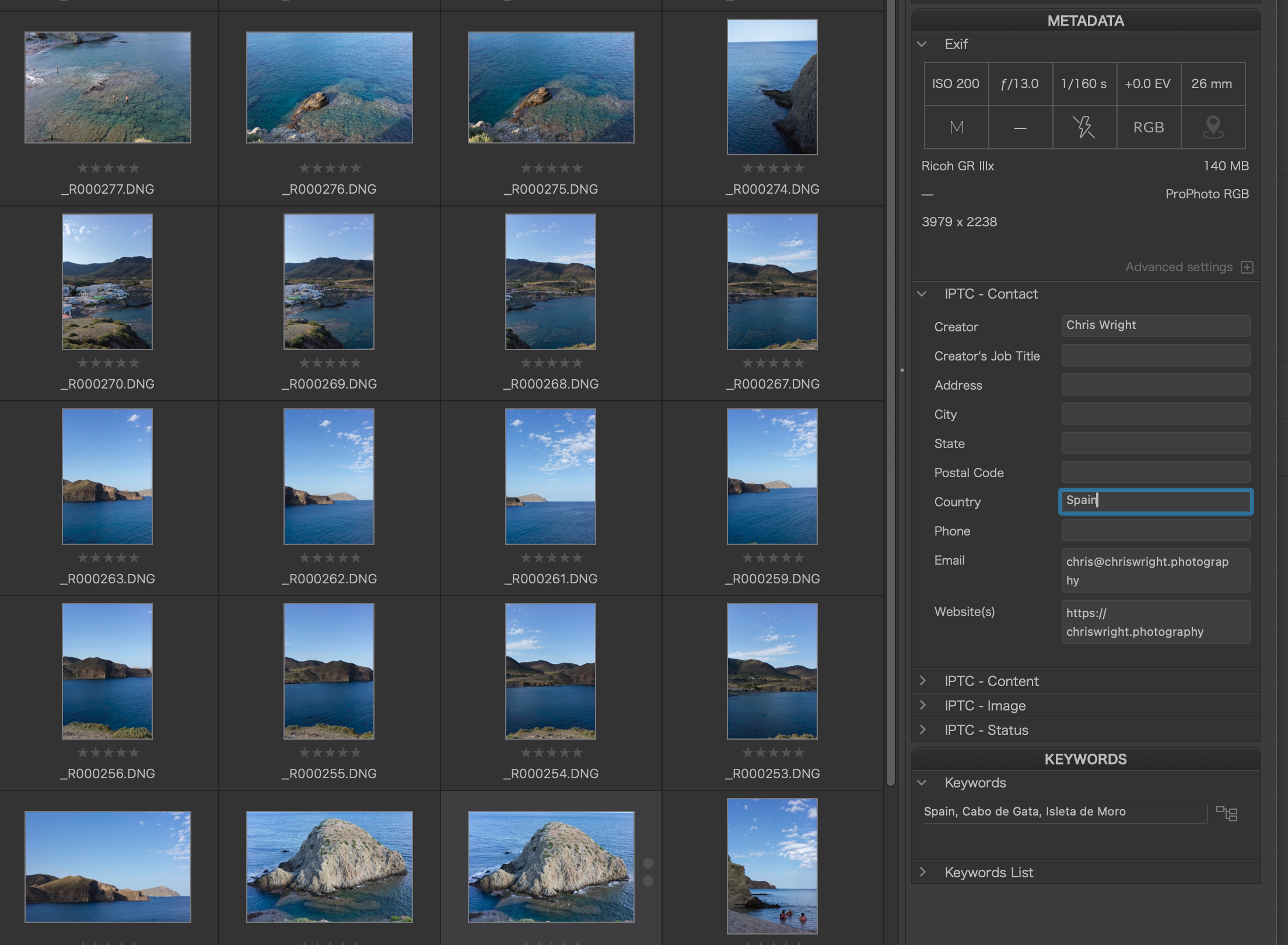
Exif Data is attached to your image when the image is taken. It will include all the camera settings, Aperture, Shutter Speed, ISO, GPS location etc. Try searching your collection for all images taken with a 50mm lens for example, or all images using f/4 aperture. You’ll be surprised at the results! And actually this is an excellent way of observing your progress as a photographer.
Descriptive Metadata
Here, you need a system. As a landscape photographer my system includes tags to identify Country, Region and Location as well as description tags such as “Waterfall” to help me locate any given photograph.
Administrative Metadata
This is the metadata that describes copyright and contact details amongst other things. Apps like Facebook routinely strip images of all metadata, but if you are thinking of selling images through stock libraries for example this metadata is important. As an aside, one of the reasons DxO PhotoLab is able to support Adobe generated metadata is because both Lightroom and PhotoLab conform to the IPTC schema.
Metadata, apart from asserting copyright at file level, is the means by which you can attach search terms or keywords to your images.
Image Organisation
To recap, you should think about your organisation on two levels, the file system and the Metadata. Keep things simple, it is easier to maintain – and there is no point in having a directory called “waterfalls” if you already have Metadata that uses the term, attached to your image.
Think of it as a logical use case aimed at locating any given image. So Client – Year – Shoot might be a good directory structure for a commercial photographer, product detail can be added in the descriptive metadata for each image. Eg. Shoe, Boot, Slipper.
Backup
In terms of backup, Once images are transferred to a drive, I copy the content of the drives to a NAS in the studio and that gets automatically backed up to the cloud every day. I then reformat the original card. A cloud repository may seem overly retentive, but my cloud bill costs about $6 per terabyte per month and that gives me total peace of mind. I use BackBlaze if you’re interested.
Managing a Large Photo Library – Conclusion
The secret to managing a large photo library is in the organisation of your file system and your metadata. Both of these tasks should be worked out offline, ahead of time and whatever structure you choose needs to be simple and consistent.
If this article has been useful, you may also want to read Catalog Management with Lightroom Classic if you are a Lightroom User.
Subscribe…
I’ll keep you in the loop with regular monthly updates on Workshops, Courses, Guides & Reviews.
Sign up here and get special prices on all courses and photowalks in 2026
I sometimes use affiliate links in our reviews and instructional material. If you purchase software or hardware through one of these links it won’t cost you any more, but it does help me to offset the costs of creating the content.
Thanks for your support!